A Simple Guide
Installation
Download
zipfile from GithubUnzip files at any location, run
python setup.py installat the folder wheresetup.pyexists
if you want to modify the code for development, please use
python setup.py develop
Run MOC code
An example python file to run MOC is provided in /examples/moc. The problem is described as: given the boundaries (upper and lower) and inlet, solve for the flowfield between the upper and lower boundaries.
Import the packages
from aeromoc.moc import MOC2D
from aeromoc.bc import BoundPoints
import numpy as np
Describe the boundary
The boundary of the computation domain are described with a series of points in the class
BoundPoints. It is constructed by usingadd_section. The code below constructs a boundary with two sections. The first section is an 20 degree arc with radius = 6.0 and center located at (0., 8.). The second section is a straight line whose x projection length = 5. and along the tangential direction of the upstream arc.kttau = 20.0 upperwall = BoundPoints() upperwall.add_section(6 * np.sin(np.linspace(0., np.pi / 180. * kttau, 15)), lambda x: 8. - (6.**2 - x**2)**0.5) upperwall.add_section(np.linspace(0, 5, 16), lambda x: np.tan(np.pi / 180. * kttau) * x)
The boundary points are also the initial points for the character lines, so they are expected to be evenly distributed along the boundaries rather than in x-direction.
For details in boundary conditions, please see Boundary Conditions.
Define the problem
The problem is defined with the object
MOC2D. Here, we set up a computional domain where the upper boundary is the wall described in advance, and the lower boundary is a symmetric one.moc = MOC2D() moc.set_boundary('u', typ='wall', points=upperwall) moc.set_boundary('l', typ='sym', y0=0.0)
Define the initial line (inlet)
The MOC calculation requires a initial line (in the present program, the left side of computation domain). Here, we use the method in NASA’s code to describe the inlet given the inlet total condition and upstream wall radius.
moc.calc_initial_line(n, mode='total', p=2015., t=2726., urUp=9.)
For details in inital methods, please see Initial Methods.
Solve for field
The problem is solved with:
moc.solve(max_step=100)
Show and save the results
moc.plot_field().show()
moc.plot_wall(side='u', var=['p', 'ma', 't'], write_to_file='upper.dat')
For details in postprocess, please see Post-process.
Run nozzle design code
An example python file to run MOC is provided in /examples/nozzle. The current code can be used to design the ideal asymmetric SERN proposed by Mo et al. Mo, 2015. The detailed theory can be found in Theory Part
Import the class for designing nozzle
from aeromoc.nozzle import NozzleDesign
Define the problem
Currently, only ideal asymmetric nozzle is available. The nozzle design operating condition are:
inlet total pressure 200kPa
inlet total temperature 1393K
ambient pressure 5kPa
The nozzle design parameters for ideal asymmetric nozzle are:
asymmetric parameter 0.7, which is defined by $\alpha = \delta_L / \delta_U$
radius for upper and lower throat upstream contour 3m
(The inlet height is default to be 1m)
nz = NozzleDesign('idealAsym', pt=200000, tt=1393, patm=5000, asym=0.7, rup=3., rlow=3.)
Solve the design problem
nz.solve()
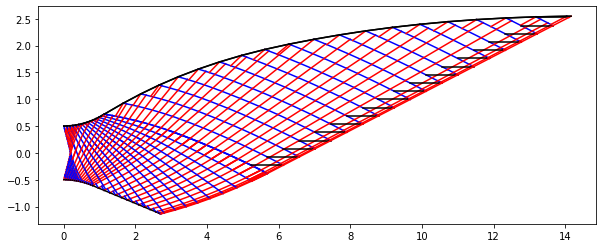
The solved nozzle field is like in the figure below:
Apply boundary
To calculate the thickness of boundary layer, the geometry of the convergence section is required. Note that the flow field in convergence section is subsonic, so the field are not solved.
nz.gen_conv_section(L=2., yt=0.5, yi=1.)
Then the boundary layer thickness is calculated at each contour point, and the corrected contour points are stored.
nz.apply_blc()
Write contour values
The contour geometry and contour values are written to
contour_geometry.datandcontour_values.dat, respectively. The files are inTecplotformat.nz.write_contour()
Plot the contour geometries
nz.plot_contour()
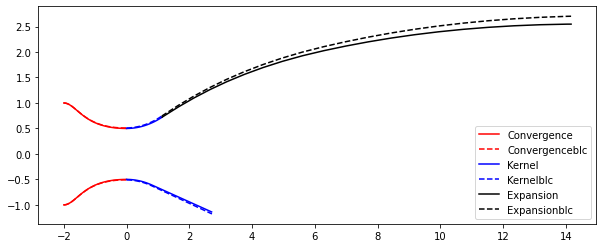
The final plot should be: